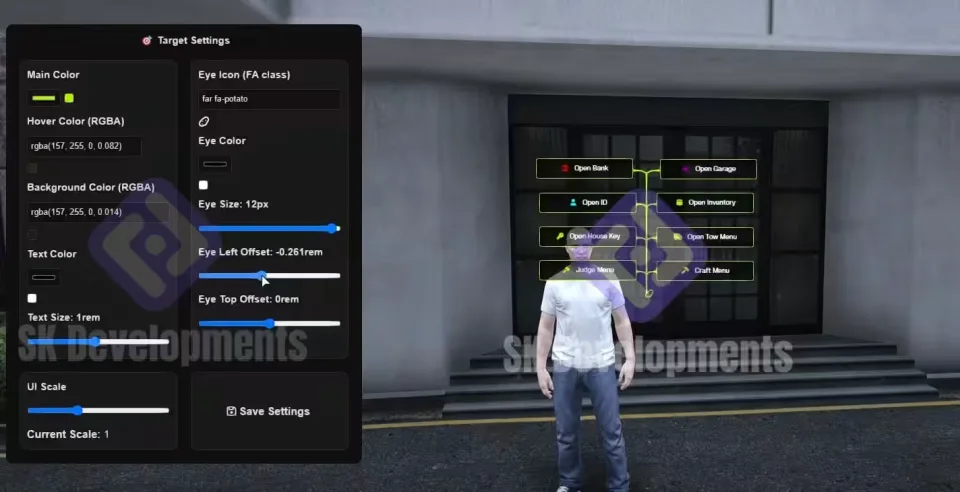
ProdigyRP 2.0 Inspired Target
A ground-up redesign of the ox_target UI that recreates the ProdigyRP 2.0 target experience with a 1:1 / 1:2 approach. It stays on ox_target and ox_lib underneath, so you keep the performance and compatibility of the ox stack while the interaction UI on screen looks nothing like stock.
What it changes
- Target UI rebuilt from scratch to match ProdigyRP 2.0
- Custom hover effects, sprite icons, and a scalable UI
- Smooth eye icon animations and active zone effects
- Modern, lightweight feel with client-side responsiveness
Exclusive config file
Every visual detail is exposed in the config, no code edits needed:
- UI scale: resize the whole interface
- Sprite colors: separate default and hover colors
- Transparency: main color, hover overlay, and background
- Eye icon: icon, size, color, and active color
- Text color: match your server's palette
- Eye placement: position offsets for exact alignment
Compatibility
Framework-independent, so it slots into most server setups whether you run ESX, QBCore, or Qbox. Optimized for performance on the client side.
What you get
A cleanly structured resource folder. Drag it in, drop it, and configure.
Product information
Compatibility, delivery and setup
Check these listing details against your server before checkout. The documentation supplied with the download is the source of truth for exact dependencies, file names and configuration.
Compatibility
- Resource type
- FiveM script
- Category
- ESX Scripts
- Creator
- Not listed
Order details
- Price
- $15.00
- Delivery
- Unique download link sent by email after checkout
- Sold by
- CFX Tebex Store Official
- Updates
- Lifetime updates included
Installation checklist
Start with the files and readme included with this product.
-
Match the requirements
This listing names esx, qbcore, qbox support. Check the description and readme for required inventory, target, library, database or map resources.
-
Keep the supplied names and order
Do not guess or rename the resource folder. Use the dependency order, config values, SQL and item definitions supplied in the download when they are present.
-
Start it after its dependencies
Upload the folder to
resources/, then addensure <download-folder>toserver.cfgusing the exact downloaded folder name. -
Test before going live
Start it on a development server, check the console for missing dependencies, then test every action described on this page with the integrations used by your live server.
Write a review
Reviews are moderated before appearing. Purchased the product? Your review gets a VERIFIED badge automatically.