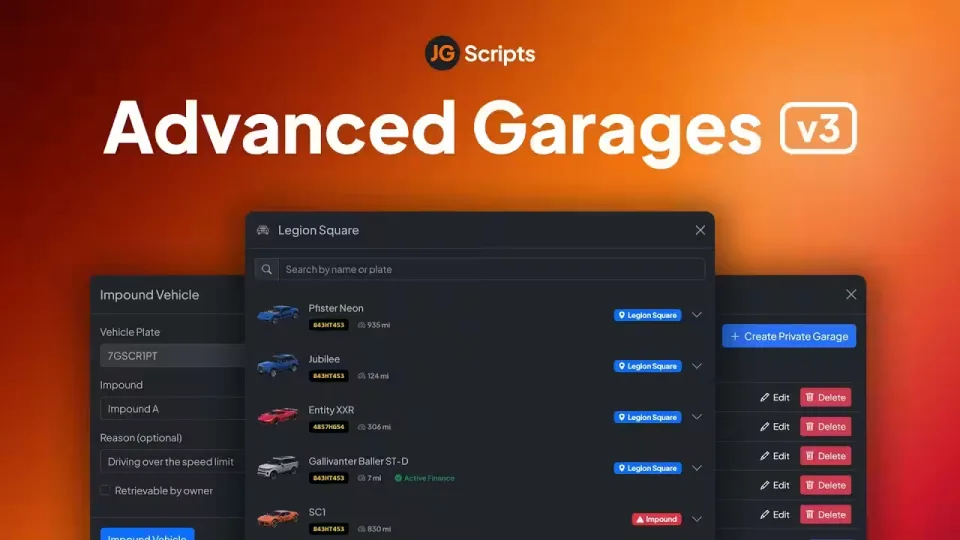
JG Advanced Garages v3
Already the most popular premium garage script on FiveM, Advanced Garages v3 covers every garage type a server needs: public, private, house, job and gang garages, plus a fully featured impound system. It runs on QBCore, Qbox and ESX Legacy, and ships with dozens of out of the box integrations with scripts from creators you already use.
💎 Intuitive and Fun to Use
Players can interact through physical garage interiors or a menu. Vehicle thumbnail previews, impound status, renaming, search and transferring vehicles to friends are all built in.
⚡ Performance and Security
Rigorously tested on servers with 300+ active players with minimal resource usage. Vehicle duplication protection, spawn pileup protection and logging make moderation straightforward on high population servers.
🚗 Infinite Garage Locations
Create as many garage locations as you like, then decide the rules: players can take a vehicle from any garage, must return to its last location, or can transfer vehicles between garages.
✈️ Car, Boat and Air Garages
Not just for cars. Set up separate boat and air garages for every garage type, impounds included.
✨ Garage Interiors
The optional interiors feature lets players walk into their garage, look around their collection and drive straight out. Entering a vehicle brings up a stats HUD with details such as fuel and damage.
🚧 Vehicle Impound
Individually configurable impound locations, restricted by job. Whitelisted members can impound a vehicle with a reason, set a retrieval cost, block self-retrieval, and set a wait time before the owner can collect it.
🧰 Job and Gang Garages
Job locked garages can hold personal vehicles, database stored shared job vehicles, or act as simple spawners that create vehicles on demand. An optional menu adds liveries, extras and performance modifications. Note: gang garages are supported out of the box on QBCore and Qbox only.
🏡 Private Garages
Housing script integrations bring garages to player houses and other private locations. For one-off cases, the in-game private garages manager lets you create, edit or delete private garages on the fly, and changes sync instantly for players.
💻 Admin Commands
A full set of commands for vehicle management, including /admincar for adding vehicles to your garage on older versions of ESX, plus /vreturn, /vplate and /dvdb.
😊 Super Easy Setup
It just works. The JG Configurator gives you an intuitive UI for configuration, so you never touch code. Paired with the third party integrations, you spend your time building the server, not sitting in an editor.
Product information
Compatibility, delivery and setup
Check these listing details against your server before checkout. The documentation supplied with the download is the source of truth for exact dependencies, file names and configuration.
Compatibility
- Resource type
- FiveM script
- Category
- ESX Scripts
- Creator
- Not listed
Order details
- Price
- $20.00
- Delivery
- Unique download link sent by email after checkout
- Sold by
- CFX Tebex Store Official
- Updates
- Lifetime updates included
Installation checklist
Start with the files and readme included with this product.
-
Match the requirements
This listing names esx, qbcore, qbox support. Check the description and readme for required inventory, target, library, database or map resources.
-
Keep the supplied names and order
Do not guess or rename the resource folder. Use the dependency order, config values, SQL and item definitions supplied in the download when they are present.
-
Start it after its dependencies
Upload the folder to
resources/, then addensure <download-folder>toserver.cfgusing the exact downloaded folder name. -
Test before going live
Start it on a development server, check the console for missing dependencies, then test every action described on this page with the integrations used by your live server.
Write a review
Reviews are moderated before appearing. Purchased the product? Your review gets a VERIFIED badge automatically.


