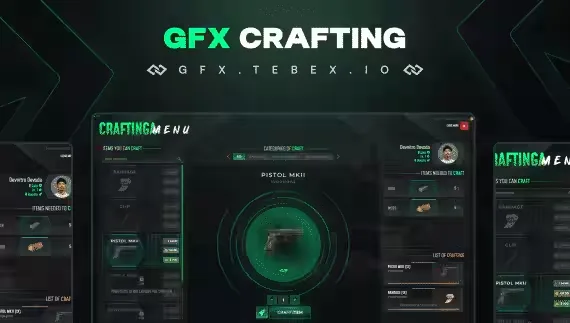
Crafting Script with Level System
A crafting script where progression actually matters. Players level up as they craft, and each new level opens up new craftable items, so your best recipes stay locked behind time at the bench instead of being available on day one.
Works on both ESX and QB out of the box, and configuration is kept simple so you can get tables running without digging through code.
What it does
- Level system: level up and unlock new craftable items as players progress
- Job-based or universal tables: lock a crafting table to a specific job, or open it to every player on the server, per table
- Visible crafting queue: players see the status and progression of everything they have queued, which turns crafting into something they plan around
- Boosting via Tebex: sell time-reduction boosts through Tebex so players can speed up their crafts, a straightforward way to tie the script into your store
- Weapon attachments: an attachment system for weapon crafting lets players fit their guns with attachments that affect gameplay
- Quick table creation: admins can add and configure new crafting tables in minutes as the server grows
Requirements
- QB or ESX
Product information
Compatibility, delivery and setup
Check these listing details against your server before checkout. The documentation supplied with the download is the source of truth for exact dependencies, file names and configuration.
Compatibility
- Resource type
- FiveM script
- Category
- ESX Scripts
- Creator
- Not listed
Order details
- Price
- $10.00
- Delivery
- Unique download link sent by email after checkout
- Sold by
- CFX Tebex Store Official
- Updates
- Lifetime updates included
Installation checklist
Start with the files and readme included with this product.
-
Match the requirements
This listing names esx, qbcore, qbox support. Check the description and readme for required inventory, target, library, database or map resources.
-
Keep the supplied names and order
Do not guess or rename the resource folder. Use the dependency order, config values, SQL and item definitions supplied in the download when they are present.
-
Start it after its dependencies
Upload the folder to
resources/, then addensure <download-folder>toserver.cfgusing the exact downloaded folder name. -
Test before going live
Start it on a development server, check the console for missing dependencies, then test every action described on this page with the integrations used by your live server.
Write a review
Reviews are moderated before appearing. Purchased the product? Your review gets a VERIFIED badge automatically.