Detective Tools
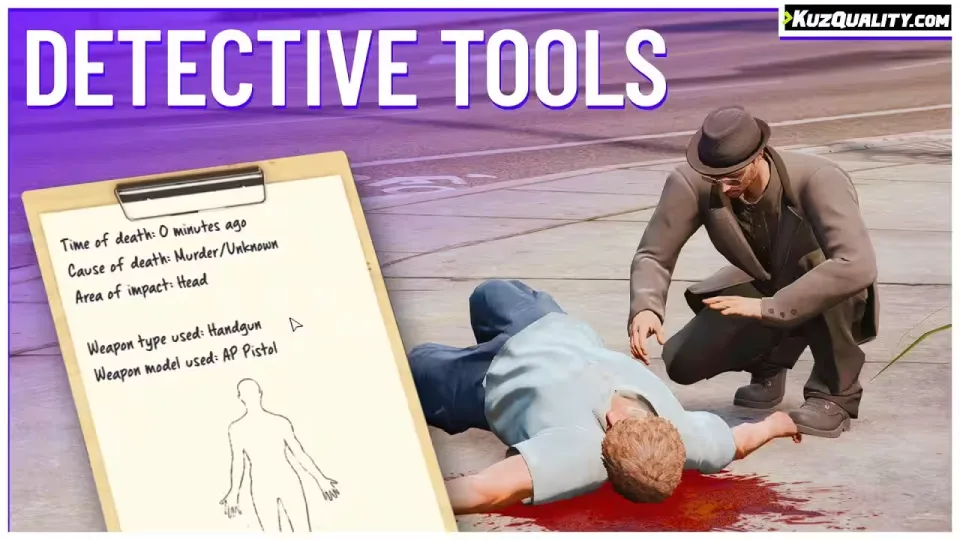
Give your players a way to investigate dead bodies. Walking up to a corpse reveals when the person died and how, so your detectives can work out whether they are looking at an accident or a murder.
The script also shows which body area took the critical blow. That one detail changes EMS roleplay: medics can treat what actually happened instead of guessing.
It runs between 0.00ms and 0.01ms, and it works with no framework at all. On ESX and QBCore you can additionally lock the detective tools to specific jobs, so only your PD or detective roles get access.
Main features
- Investigate dead players
- Investigate dead NPCs
- Reveals time and cause of death, accident or murder
- Shows the body area that received the critical blow
- Good looking, optimized UI
- Job restriction: on ESX and QBCore, enable the tools for specific jobs only
- Compatible with qtarget, qb-target and ox_target, none of them required
- Highly configurable
Compatibility
- Standalone
- ESX
- QBCore
- QBox
- VRP
This resource works on all servers, including ESX, QBCore, QBox, VRP and servers running no framework at all.
Product information
Compatibility, delivery and setup
Check these listing details against your server before checkout. The documentation supplied with the download is the source of truth for exact dependencies, file names and configuration.
Compatibility
- Resource type
- FiveM script
- Category
- ESX Scripts
- Creator
- Not listed
Order details
- Price
- $9.00
- Delivery
- Unique download link sent by email after checkout
- Sold by
- CFX Tebex Store Official
- Updates
- Lifetime updates included
Installation checklist
Start with the files and readme included with this product.
-
Match the requirements
This listing names esx, qbcore, qbox support. Check the description and readme for required inventory, target, library, database or map resources.
-
Keep the supplied names and order
Do not guess or rename the resource folder. Use the dependency order, config values, SQL and item definitions supplied in the download when they are present.
-
Start it after its dependencies
Upload the folder to
resources/, then addensure <download-folder>toserver.cfgusing the exact downloaded folder name. -
Test before going live
Start it on a development server, check the console for missing dependencies, then test every action described on this page with the integrations used by your live server.
Write a review
Reviews are moderated before appearing. Purchased the product? Your review gets a VERIFIED badge automatically.