GFX Crew Recruiting Script
Give your players a reason to organize. With GFX Crew they can found their own crew, recruit members, and climb the server rankings against every other crew in the city. The script is standalone and works on any framework, with no dependencies to install.
The Crew Menu
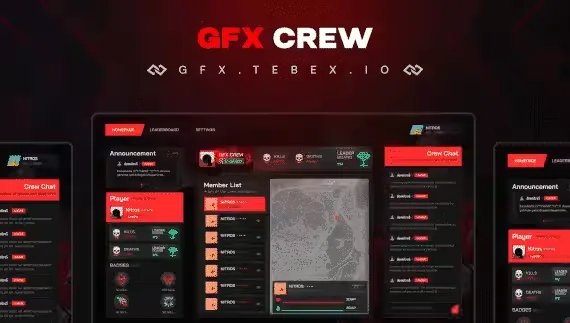
- Homepage: members read announcements posted by crew leaders, check general crew information, and talk in a chat channel that belongs to the crew alone. Selecting a player shows their vitals on the left side of the screen, including health, weapons used, and their statistics.
- Leaderboard: every crew on your server is ranked by its statistics, so the fight for the top spot happens between your players, not in your Discord.
- Settings: leaders control the crew's private details (Name, Tag, Logo, Banner), build custom roles, and decide exactly what each role is allowed to do, from editing crew information to kicking or editing members. Roles can be assigned to players, and members can be removed from the crew entirely.
In the City
Crew members see one another on the map at all times, and vital information about each member's character is displayed above their head, so a crew rolls out knowing who is where and in what shape.
Requirements
None. Drop it in and go.
Product information
Compatibility, delivery and setup
Check these listing details against your server before checkout. The documentation supplied with the download is the source of truth for exact dependencies, file names and configuration.
Compatibility
- Resource type
- FiveM script
- Category
- ESX Scripts
- Creator
- Not listed
Order details
- Price
- $15.00
- Delivery
- Unique download link sent by email after checkout
- Sold by
- CFX Tebex Store Official
- Updates
- Lifetime updates included
Installation checklist
Start with the files and readme included with this product.
-
Match the requirements
This listing names esx, qbcore, qbox support. Check the description and readme for required inventory, target, library, database or map resources.
-
Keep the supplied names and order
Do not guess or rename the resource folder. Use the dependency order, config values, SQL and item definitions supplied in the download when they are present.
-
Start it after its dependencies
Upload the folder to
resources/, then addensure <download-folder>toserver.cfgusing the exact downloaded folder name. -
Test before going live
Start it on a development server, check the console for missing dependencies, then test every action described on this page with the integrations used by your live server.
Write a review
Reviews are moderated before appearing. Purchased the product? Your review gets a VERIFIED badge automatically.


