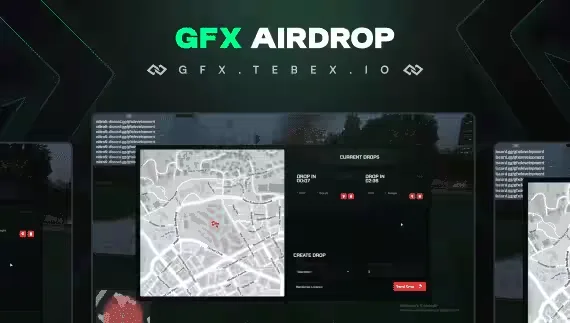
GFX Advanced Airdrop Menu
An airdrop script for FiveM that puts drop creation in your players' hands. Authorized players open the menu, pick a spot anywhere on the map, choose what goes in the crate, and call it in. Built for QB-Core and ESX, and fully integrated with GFX Inventory.
What the menu does
- Live map visualization: active drop locations show on the map in real time, so everyone who should know about a drop can see it.
- Customizable item selection: choose the specific items for each drop straight from the menu, no config file edits per drop.
- Active drop monitoring: track every ongoing drop and its status from one screen.
Why it works for roleplay
Because drops are created by players rather than a server event timer, they become part of the story. A gang stages a supply run, a smuggler sells drop coordinates, staff seed a contested crate for a turf war. Anywhere on the map is a valid drop zone, so the strategy around where and when to call one in is up to your community.
Watch the demo video to see the script running in real time before you buy. Available on the Tebex store.
Product information
Compatibility, delivery and setup
Check these listing details against your server before checkout. The documentation supplied with the download is the source of truth for exact dependencies, file names and configuration.
Compatibility
- Resource type
- FiveM script
- Category
- ESX Scripts
- Creator
- Not listed
Order details
- Price
- $15.00
- Delivery
- Unique download link sent by email after checkout
- Sold by
- CFX Tebex Store Official
- Updates
- Lifetime updates included
Installation checklist
Start with the files and readme included with this product.
-
Match the requirements
This listing names esx, qbcore, qbox support. Check the description and readme for required inventory, target, library, database or map resources.
-
Keep the supplied names and order
Do not guess or rename the resource folder. Use the dependency order, config values, SQL and item definitions supplied in the download when they are present.
-
Start it after its dependencies
Upload the folder to
resources/, then addensure <download-folder>toserver.cfgusing the exact downloaded folder name. -
Test before going live
Start it on a development server, check the console for missing dependencies, then test every action described on this page with the integrations used by your live server.
Write a review
Reviews are moderated before appearing. Purchased the product? Your review gets a VERIFIED badge automatically.