Weapon Attachments Assembler by GFX
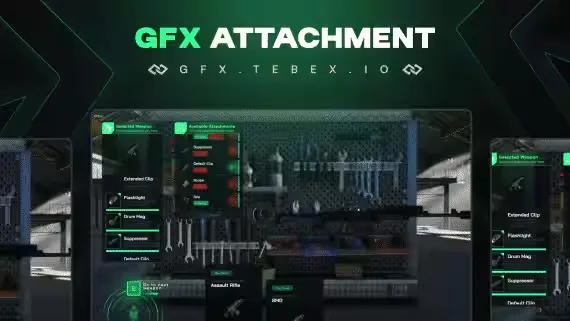
Give your players a proper way to build out their guns. With the GFX Weapon Attachments Assembler, anyone on your server can open the menu, pick the attachments that suit their weapon, and fit them in seconds. While they browse, a 3D model of the weapon sits on the right side of the screen and updates as they customize, so they see exactly what they are putting together.
The script runs on ESX and qb-core, and it can also work on its own with GFX Inventory.
What You Get
- 3D weapon view: players see a live 3D model of the gun beside the menu while fitting attachments
- Clean UI menu: a modern interface that keeps attaching parts quick and simple
- Placeable attachment tables: set the locations and number of assembler tables in the config
- Full config control: every weapon and attachment is defined in the config file, and you can add new weapons or swap attachment images whenever you want
- Framework support: works with ESX, qb-core, and standalone through GFX Inventory
Requirements
One of the following: QB, ESX, or GFX Inventory.
Product information
Compatibility, delivery and setup
Check these listing details against your server before checkout. The documentation supplied with the download is the source of truth for exact dependencies, file names and configuration.
Compatibility
- Resource type
- FiveM script
- Category
- ESX Scripts
- Creator
- Not listed
Order details
- Price
- $10.00
- Delivery
- Unique download link sent by email after checkout
- Sold by
- CFX Tebex Store Official
- Updates
- Lifetime updates included
Installation checklist
Start with the files and readme included with this product.
-
Match the requirements
This listing names esx, qbcore, qbox support. Check the description and readme for required inventory, target, library, database or map resources.
-
Keep the supplied names and order
Do not guess or rename the resource folder. Use the dependency order, config values, SQL and item definitions supplied in the download when they are present.
-
Start it after its dependencies
Upload the folder to
resources/, then addensure <download-folder>toserver.cfgusing the exact downloaded folder name. -
Test before going live
Start it on a development server, check the console for missing dependencies, then test every action described on this page with the integrations used by your live server.
Write a review
Reviews are moderated before appearing. Purchased the product? Your review gets a VERIFIED badge automatically.