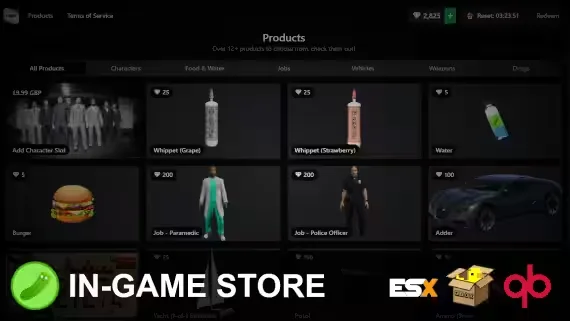
Free In-Game Tebex Store
The first Tebex-integrated store system for FiveM with direct purchasing, checkout in as little as 5 seconds, automatic in-game redemption, and its own coin currency system.
Display your Tebex packages to players in-game, run scheduled ads for your store, and create coin products from inside the game with no restart required.
Is this allowed?
Yes. As long as players can earn coins (diamonds by default) through regular gameplay, this is fine, and the script handles that out of the box with free daily spins. Tebex remains the only way to purchase coins, and the script cannot connect to any platform other than Tebex itself.
Features
- Automatic checkout: as fast as 5 seconds, requires a Discord role reward
- Redemption system: automatic, or manual via transaction ID
- In-game coin currency: rename it to anything you like (pickles, emeralds, etc)
- Create coin products in-game: no Lua configging required
- Automatic package sync: add a package on Tebex and it shows up in-game with zero configuration
- One-of-one purchases: sell a package once and it removes itself when bought
- Purchase limits: global and per-user limits on coin products (0 = no limit)
- Custom commands: attach commands to coin products with customer field support via the config
- Scheduled ads: in-game store ads on a timer, set in the config
- Free daily spins: players earn spins as a reward for playing
- Playtime rewards: schedule free coins per time played
- 10+ coin packages included by default
- And more
Requirements
- ESX (1.1+), QBox or QB, or code your own bridge for another framework (the bridge is fully accessible)
- ox_lib (required, works anywhere)
Product information
Compatibility, delivery and setup
Check these listing details against your server before checkout. The documentation supplied with the download is the source of truth for exact dependencies, file names and configuration.
Compatibility
- Resource type
- FiveM script
- Category
- ESX Scripts
- Creator
- Not listed
Order details
- Price
- FREE
- Delivery
- Unique download link sent by email after checkout
- Sold by
- CFX Tebex Store Official
- Updates
- Lifetime updates included
Installation checklist
Start with the files and readme included with this product.
-
Match the requirements
This listing names esx, qbcore, qbox support. Check the description and readme for required inventory, target, library, database or map resources.
-
Keep the supplied names and order
Do not guess or rename the resource folder. Use the dependency order, config values, SQL and item definitions supplied in the download when they are present.
-
Start it after its dependencies
Upload the folder to
resources/, then addensure <download-folder>toserver.cfgusing the exact downloaded folder name. -
Test before going live
Start it on a development server, check the console for missing dependencies, then test every action described on this page with the integrations used by your live server.
Write a review
Reviews are moderated before appearing. Purchased the product? Your review gets a VERIFIED badge automatically.