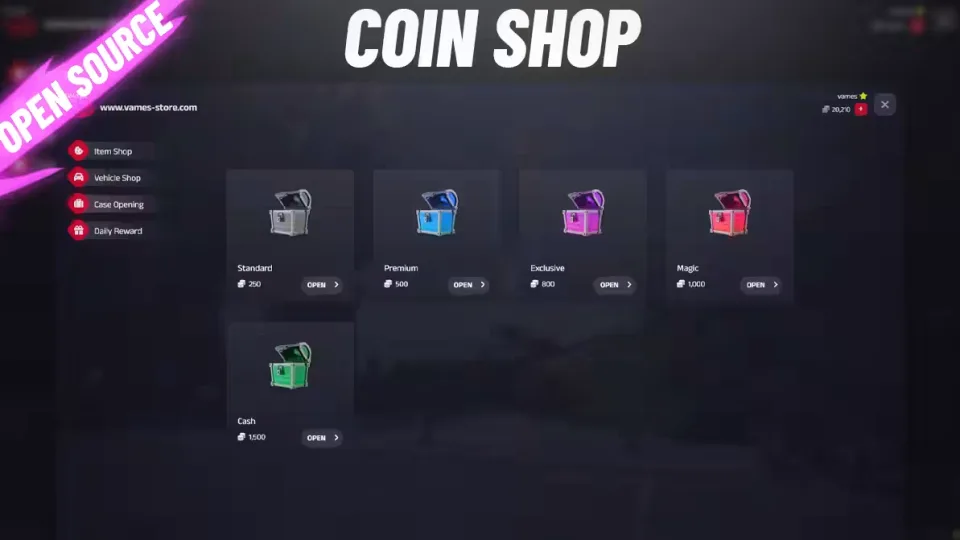
Tebex Case Opening Script
A case opening system that plugs into your Tebex store, letting players spend coins on cases and win items, weapons, vehicles or money. Works on ESX and QB-Core, with a responsive UI and a built-in VIP tier.
How rewards work
Everything the script hands out runs through config.server.lua, so you decide exactly how items, weapons, vehicles and money are given, including the database side. Drop percentages are configurable per case, so you control the odds on every crate you sell.
Vehicle wins done properly
Vehicles bought or won through the Coin Shop can carry a special license plate prefix, for example [C 553282], so they stand out from every other car on the server. When a vehicle is awarded, the script generates a plate and checks it against the database; if the plate already exists, it draws another one until it finds a free plate.
VIP pricing
VIP status is more than a badge. You can set special VIP prices on individual items, vehicles and whole cases, giving your supporters a real reason to hold the rank.
Also included
- Tebex API: compatible out of the box
- Name display: choose whether the menu shows the player's Steam nickname or their character name
- Cheat protection: the script is secured against cheats
- PSD file: the case artwork ships as a .PSD so you can restyle cases in the same look
Product information
Compatibility, delivery and setup
Check these listing details against your server before checkout. The documentation supplied with the download is the source of truth for exact dependencies, file names and configuration.
Compatibility
- Resource type
- FiveM script
- Category
- ESX Scripts
- Creator
- Not listed
Order details
- Price
- $15.00
- Delivery
- Unique download link sent by email after checkout
- Sold by
- CFX Tebex Store Official
- Updates
- Lifetime updates included
Installation checklist
Start with the files and readme included with this product.
-
Match the requirements
This listing names esx, qbcore, qbox support. Check the description and readme for required inventory, target, library, database or map resources.
-
Keep the supplied names and order
Do not guess or rename the resource folder. Use the dependency order, config values, SQL and item definitions supplied in the download when they are present.
-
Start it after its dependencies
Upload the folder to
resources/, then addensure <download-folder>toserver.cfgusing the exact downloaded folder name. -
Test before going live
Start it on a development server, check the console for missing dependencies, then test every action described on this page with the integrations used by your live server.
Write a review
Reviews are moderated before appearing. Purchased the product? Your review gets a VERIFIED badge automatically.


