Free Spawn Selector
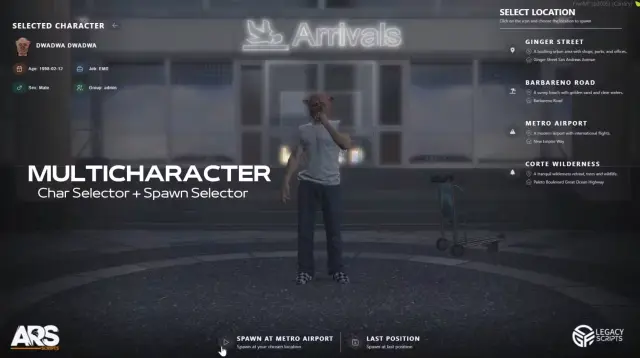
A free spawn selector that lets admins build the whole spawn list in-game instead of editing coordinates in a file. Open the admin UI, create a point where you stand, give it a name, an image, and a price, then it shows up for players in a clean selector interface. Set the price to zero and it works as a normal free spawn.
The purchasable side is what sets it apart: players walk up to a map marker, buy the location through the custom UI, and from then on it appears in their spawn selection. That makes it a natural fit for premium housing mechanics, gang territory, or any RP server that wants spawn access to mean something.
Features
- Admin mode: create new spawn points directly in-game and manage them through an intuitive admin UI
- Full control per spawn: set name, image, coordinates, and price, with free spawns supported
- Purchasable locations: players unlock spawn points by buying them at map markers
- Purchase and selection UI: one custom interface handles both buying and spawning
- Visual spawn map: every point appears on the map or selector UI, so players always know their options
- Housing compatibility: works alongside apartment and housing scripts
- Simple setup: responsive design, a straightforward config, and solid performance
Drop it in, add your locations in-game, and your spawn system is done.
Product information
Compatibility, delivery and setup
Check these listing details against your server before checkout. The documentation supplied with the download is the source of truth for exact dependencies, file names and configuration.
Compatibility
- Resource type
- FiveM script
- Category
- AK4Y
- Creator
- Not listed
Order details
- Price
- FREE
- Delivery
- Unique download link sent by email after checkout
- Sold by
- CFX Tebex Store Official
- Updates
- Lifetime updates included
Installation checklist
Start with the files and readme included with this product.
-
Match the requirements
This listing names esx, qbcore, qbox support. Check the description and readme for required inventory, target, library, database or map resources.
-
Keep the supplied names and order
Do not guess or rename the resource folder. Use the dependency order, config values, SQL and item definitions supplied in the download when they are present.
-
Start it after its dependencies
Upload the folder to
resources/, then addensure <download-folder>toserver.cfgusing the exact downloaded folder name. -
Test before going live
Start it on a development server, check the console for missing dependencies, then test every action described on this page with the integrations used by your live server.
Write a review
Reviews are moderated before appearing. Purchased the product? Your review gets a VERIFIED badge automatically.