GFX Leaderboard, TOP 3 Character Showcase
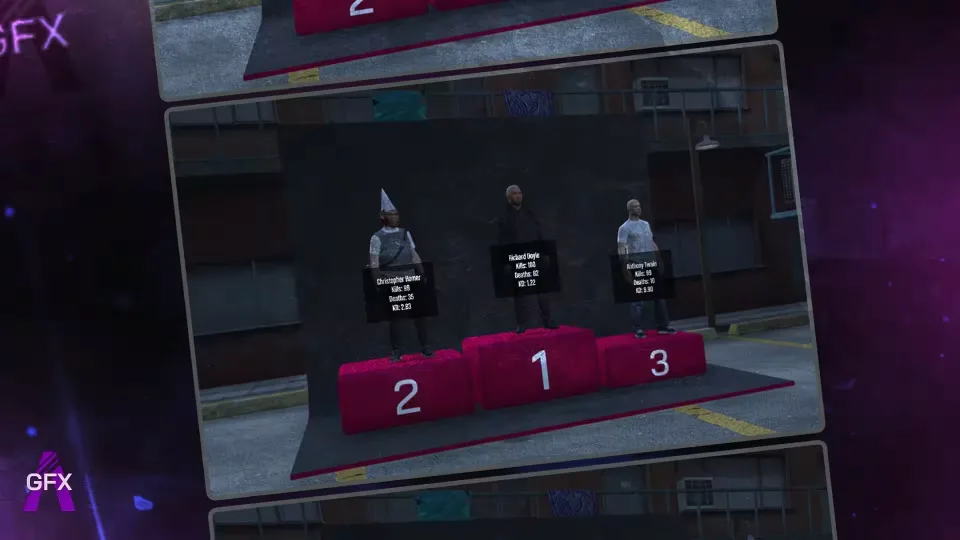
A kill and death leaderboard that puts your top players on display. The TOP 3 stand on a platform rendered with their actual in-game characters, with separate rankings for kills and deaths, so the whole server can see exactly who is on top.
Data updates instantly in-game. The board shows each player their own stats alongside the rankings of everyone else, no waiting for a restart or a refresh cycle.
Features
- Instant updates: leaderboard data refreshes live in-game
- TOP 3 platform: the three leaders appear with their own characters, split into killing and dying categories
- Full rankings: players see their own information plus every other player's position
- Player avatars: set a steamwebapi_key to pull player images; without one, a default image is shown instead
Requirements
- Standalone
The script runs standalone, but depending on your skin script you may need to edit the open file with your skin data. That edit is your responsibility.
Product information
Compatibility, delivery and setup
Check these listing details against your server before checkout. The documentation supplied with the download is the source of truth for exact dependencies, file names and configuration.
Compatibility
- Resource type
- FiveM script
- Category
- ESX Scripts
- Creator
- Not listed
Order details
- Price
- $9.00
- Delivery
- Unique download link sent by email after checkout
- Sold by
- CFX Tebex Store Official
- Updates
- Lifetime updates included
Installation checklist
Start with the files and readme included with this product.
-
Match the requirements
This listing names esx, qbcore, qbox support. Check the description and readme for required inventory, target, library, database or map resources.
-
Keep the supplied names and order
Do not guess or rename the resource folder. Use the dependency order, config values, SQL and item definitions supplied in the download when they are present.
-
Start it after its dependencies
Upload the folder to
resources/, then addensure <download-folder>toserver.cfgusing the exact downloaded folder name. -
Test before going live
Start it on a development server, check the console for missing dependencies, then test every action described on this page with the integrations used by your live server.
Write a review
Reviews are moderated before appearing. Purchased the product? Your review gets a VERIFIED badge automatically.