Arius Billing V2
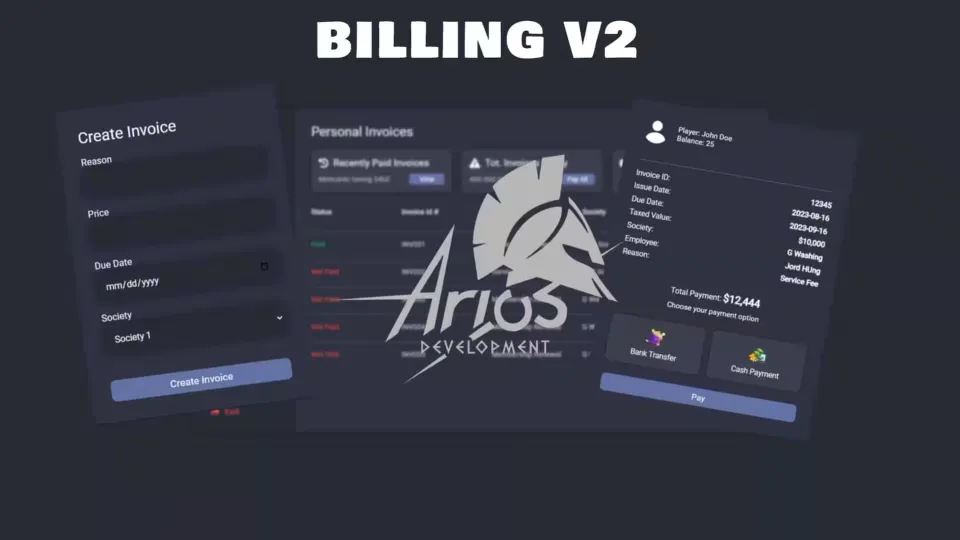
A complete invoicing system for your server's economy. Players bill each other directly, societies invoice their customers, and city jobs issue official invoices, all handled by one script that idles at 0.0ms.
Creating invoices
- Personal invoices: bill another player directly, with a custom player select so the money goes to the right person.
- Society invoices: invoice on behalf of your job, with control over which invoices are created by you and which by your society.
- City invoices: official invoices reserved for specific jobs.
- Grade and job based functions: gate who can issue what by their job and rank.
Paying and history
Every invoice a player owes sits in one list, and they can clear all of them with a single click. The UI also shows the most recent invoice paid and a full history of settled invoices, so disputes over who paid what resolve themselves.
Compatibility
Runs on ESX, QBCore and Qbox. The only dependency is your framework core: es_extended, qb-core or qbx_core. Locales support is built in, so you can translate the whole script for your community.
Product information
Compatibility, delivery and setup
Check these listing details against your server before checkout. The documentation supplied with the download is the source of truth for exact dependencies, file names and configuration.
Compatibility
- Resource type
- FiveM script
- Category
- Arius Scripts
- Creator
- Not listed
Order details
- Price
- $15.00
- Delivery
- Unique download link sent by email after checkout
- Sold by
- CFX Tebex Store Official
- Updates
- Lifetime updates included
Installation checklist
Start with the files and readme included with this product.
-
Match the requirements
This listing names esx, qbcore, qbox support. Check the description and readme for required inventory, target, library, database or map resources.
-
Keep the supplied names and order
Do not guess or rename the resource folder. Use the dependency order, config values, SQL and item definitions supplied in the download when they are present.
-
Start it after its dependencies
Upload the folder to
resources/, then addensure <download-folder>toserver.cfgusing the exact downloaded folder name. -
Test before going live
Start it on a development server, check the console for missing dependencies, then test every action described on this page with the integrations used by your live server.
Write a review
Reviews are moderated before appearing. Purchased the product? Your review gets a VERIFIED badge automatically.