Vehicle Selling and Auction System
A player driven vehicle marketplace for your FiveM server that handles both direct sales and auctions, with the listed cars physically present in the world instead of hidden behind a menu.
Vehicles That Exist in the World
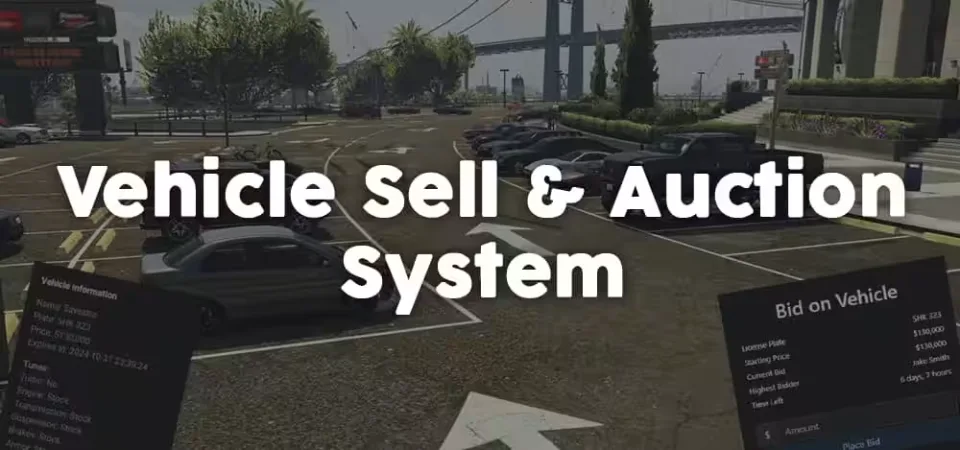
Listed vehicles spawn automatically at predefined spots when a player approaches the sales area, so buyers walk the lot and look at the actual car. Once players leave, the vehicles despawn again to keep performance clean.
Two Ways to Sell
- Direct Sale: set a fixed price for immediate purchase.
- Auction: list the vehicle for bidding and let other players compete for it.
The listing UI lets sellers set the price, sale type, and duration, anywhere from 12 hours up to a full week.
Live Auctions
Buyers place bids and track auctions in real time, with updates on the current highest bid and the time remaining before the hammer falls.
Detailed Vehicle Info
Every listed car opens a detailed info dialog showing the vehicle name, plate, price, and sale expiration, plus its installed modifications: engine, transmission, suspension, brakes, and turbo. Buyers know exactly what they are bidding on.
Tuning Carries Over
Full support for vehicle properties means a modified car sells with its modifications intact. What the buyer saw on the lot is what lands in their garage.
Server-Side Security
All vehicle interactions run through secure server-side callbacks with proper validation. The system checks listing eligibility to block exploits and invalid entries, and you can add your own checks to keep unwanted vehicles off the market.
Product information
Compatibility, delivery and setup
Check these listing details against your server before checkout. The documentation supplied with the download is the source of truth for exact dependencies, file names and configuration.
Compatibility
- Resource type
- FiveM script
- Category
- ESX Scripts
- Creator
- Not listed
Order details
- Price
- $11.99
- Delivery
- Unique download link sent by email after checkout
- Sold by
- CFX Tebex Store Official
- Updates
- Lifetime updates included
Installation checklist
Start with the files and readme included with this product.
-
Match the requirements
This listing names esx, qbcore, qbox support. Check the description and readme for required inventory, target, library, database or map resources.
-
Keep the supplied names and order
Do not guess or rename the resource folder. Use the dependency order, config values, SQL and item definitions supplied in the download when they are present.
-
Start it after its dependencies
Upload the folder to
resources/, then addensure <download-folder>toserver.cfgusing the exact downloaded folder name. -
Test before going live
Start it on a development server, check the console for missing dependencies, then test every action described on this page with the integrations used by your live server.
Write a review
Reviews are moderated before appearing. Purchased the product? Your review gets a VERIFIED badge automatically.