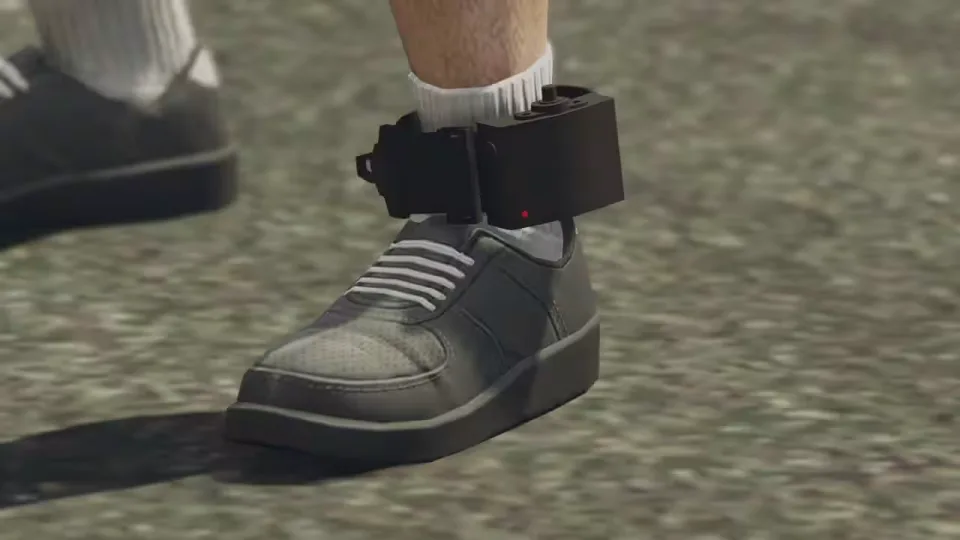
Advanced Ankle Monitor
Fit an offender with a tracking device and watch their live position on the map. Officers can enforce parole conditions or keep someone out of a restricted area, and criminals get a reason to cooperate, since the monitor can be lockpicked off by another player. Both sides of a traffic stop end up with something new to play with.
Features
- Ankle monitor prop included with the files (credits to @nmcbc).
- Runs fully standalone through commands, with optional job or item requirements and target-based interactions.
- Tracked player positions update on an interval you can configure, keeping the focus on performance.
- Lockpicking the monitor off another player encourages teamwork among criminals, and the option can be fully disabled.
- Fully synchronized between players.
- Animations included.
- Highly configurable through the config.
How It Works
- Apply the ankle monitor to a player through a target system or a command.
- Observe their live location on the map and enforce the law accordingly.
- Removal is your call: let law enforcement take it off, or have someone lockpick it free.
Resmon: 0.00ms idle, ~0.00ms while a tracker is worn.
Update 1.1.0
- New command to toggle all ankle monitor blips on or off.
- Whitelist command that keeps chosen players displayed even when blips are toggled off.
- Both commands are configured at the bottom of config.lua, and a short showcase video of them is available on Streamable.
Product information
Compatibility, delivery and setup
Check these listing details against your server before checkout. The documentation supplied with the download is the source of truth for exact dependencies, file names and configuration.
Compatibility
- Resource type
- FiveM script
- Category
- ESX Scripts
- Creator
- Not listed
Order details
- Price
- $10.00
- Delivery
- Unique download link sent by email after checkout
- Sold by
- CFX Tebex Store Official
- Updates
- Lifetime updates included
Installation checklist
Start with the files and readme included with this product.
-
Match the requirements
This listing names esx, qbcore, qbox support. Check the description and readme for required inventory, target, library, database or map resources.
-
Keep the supplied names and order
Do not guess or rename the resource folder. Use the dependency order, config values, SQL and item definitions supplied in the download when they are present.
-
Start it after its dependencies
Upload the folder to
resources/, then addensure <download-folder>toserver.cfgusing the exact downloaded folder name. -
Test before going live
Start it on a development server, check the console for missing dependencies, then test every action described on this page with the integrations used by your live server.
Write a review
Reviews are moderated before appearing. Purchased the product? Your review gets a VERIFIED badge automatically.


