Electrician Job for FiveM
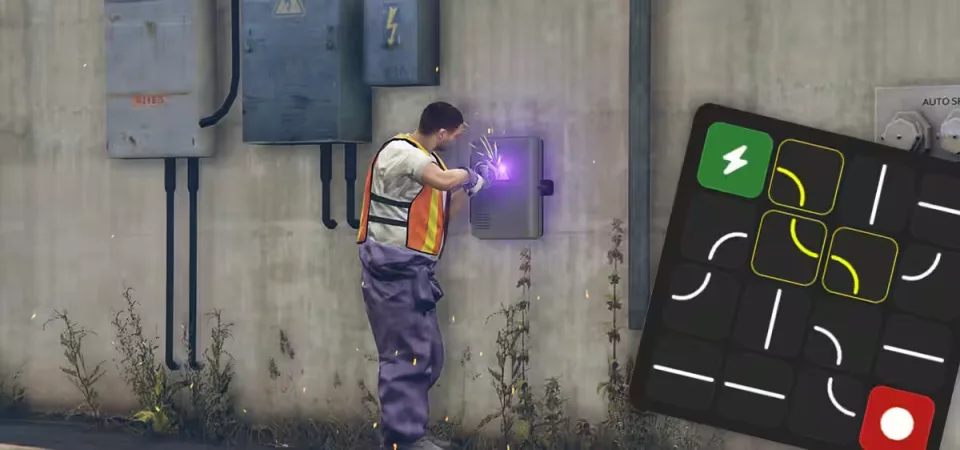
Somebody has to keep the lights on in Los Santos. This electrician job puts players to work repairing electrical fuseboxes across the city, and every repair runs through a proper circuit minigame: a 4x4 grid where you rotate circuit pieces until the connection completes, with the power line lighting up in real time as you solve it.
How a shift plays out
Start at the job NPC, who greets players with voice lines rather than a silent menu. Grab a work vehicle from one of multiple spawn points, with a deposit on the vehicle and a return step to stop people abusing it. Each shift assigns a randomized set of fuseboxes from a large pool of pre-configured locations, so no two shifts follow the same route, and blips plus smart navigation point you to each one. At the box itself you work on an interactive fuse box prop with sparking particle effects and welding animations. Pay lands per repair, with a bonus on top for clearing every repair in the shift.
Under the hood
- Framework support: automatic ESX and QBCore detection, with ox_target and qb-target integration for easy server setup.
- Anti-exploit: server-side validation on every action, backed by location verification and state tracking.
- Configuration: payments, cooldowns and locations are all adjustable, with multi-language support built in.
Resmon
- Idle: 0.00ms. Active job: 0.00ms.
Product information
Compatibility, delivery and setup
Check these listing details against your server before checkout. The documentation supplied with the download is the source of truth for exact dependencies, file names and configuration.
Compatibility
- Resource type
- FiveM script
- Category
- ESX Scripts
- Creator
- Not listed
Order details
- Price
- $9.00
- Delivery
- Unique download link sent by email after checkout
- Sold by
- CFX Tebex Store Official
- Updates
- Lifetime updates included
Installation checklist
Start with the files and readme included with this product.
-
Match the requirements
This listing names esx, qbcore, qbox support. Check the description and readme for required inventory, target, library, database or map resources.
-
Keep the supplied names and order
Do not guess or rename the resource folder. Use the dependency order, config values, SQL and item definitions supplied in the download when they are present.
-
Start it after its dependencies
Upload the folder to
resources/, then addensure <download-folder>toserver.cfgusing the exact downloaded folder name. -
Test before going live
Start it on a development server, check the console for missing dependencies, then test every action described on this page with the integrations used by your live server.
Write a review
Reviews are moderated before appearing. Purchased the product? Your review gets a VERIFIED badge automatically.