Free Drone Script for FiveM
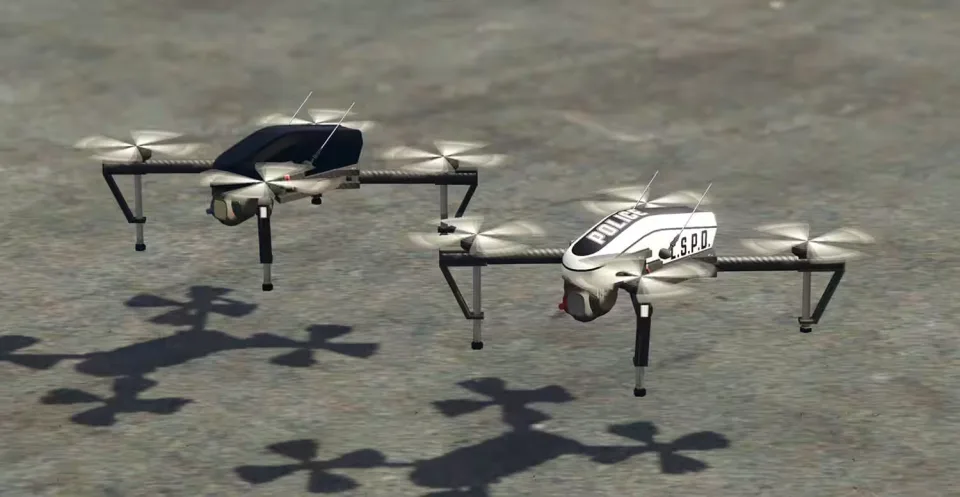
A free drone system that gives both civilians and police something worth flying. Deploy a drone from your inventory or with a command, steer it with proper throttle, yaw, pitch and roll, and grab aerial photos through the optional Fivemanage screenshot integration. Drones take damage, lose signal at range, and will crash if you fly them badly, so pilots have to actually pay attention.
What you get
- Two drone types: standard and police drones, each with its own range, flight time and feature set.
- Civilian and emergency use: restrict drones to specific jobs or open them to every player, fully configurable.
- Flight controls: custom-mapped throttle, yaw, pitch, roll and camera movement, with controller support included.
- Customizable HUD: toggle the compass, battery status, flight data, screenshot button and more.
- Damage and signal system: drones show effects when hit or out of range, and can crash if misused.
- Night vision: the emergency drone carries enhanced optics for nighttime operations.
- Item-based usage: integrates with inventory systems so drones exist as real in-game items.
- Command-based option: if you would rather skip items, drones can be deployed by command instead.
- Aerial screenshots: optional in-game photo capture using Fivemanage.
Performance
0.00ms idle, 0.08ms while a drone is in the air.
Product information
Compatibility, delivery and setup
Check these listing details against your server before checkout. The documentation supplied with the download is the source of truth for exact dependencies, file names and configuration.
Compatibility
- Resource type
- FiveM script
- Category
- ESX Scripts
- Creator
- Not listed
Order details
- Price
- FREE
- Delivery
- Unique download link sent by email after checkout
- Sold by
- CFX Tebex Store Official
- Updates
- Lifetime updates included
Installation checklist
Start with the files and readme included with this product.
-
Match the requirements
This listing names esx, qbcore, qbox support. Check the description and readme for required inventory, target, library, database or map resources.
-
Keep the supplied names and order
Do not guess or rename the resource folder. Use the dependency order, config values, SQL and item definitions supplied in the download when they are present.
-
Start it after its dependencies
Upload the folder to
resources/, then addensure <download-folder>toserver.cfgusing the exact downloaded folder name. -
Test before going live
Start it on a development server, check the console for missing dependencies, then test every action described on this page with the integrations used by your live server.
Write a review
Reviews are moderated before appearing. Purchased the product? Your review gets a VERIFIED badge automatically.