Advanced Tuning UI
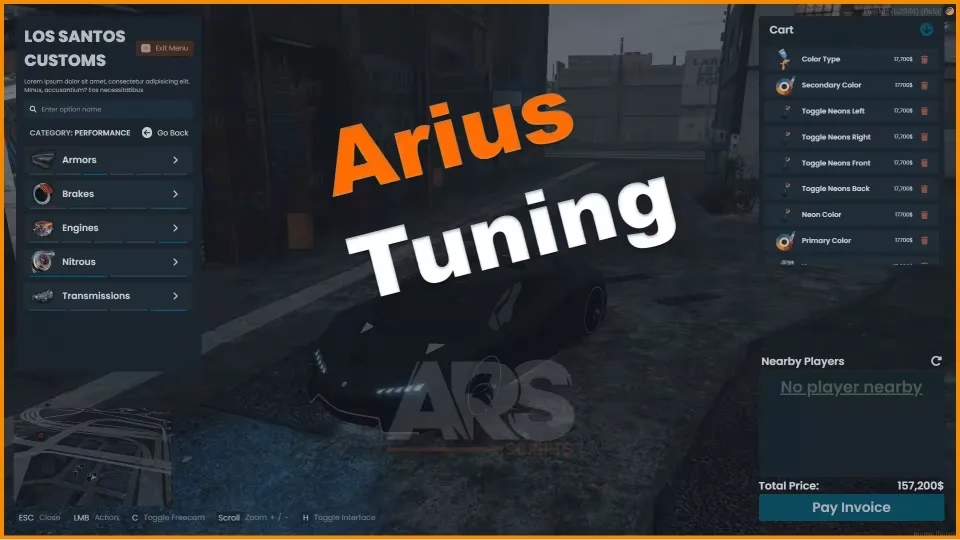
A vehicle tuning menu for servers that want more than the default mod shop. Set up multiple tuning stations across the map, let players browse components with a built-in search, inspect the car through FreeCam, then cart everything up and settle it through the internal invoice system. When the work is done, the script saves the vehicle's properties automatically.
Features
- Multiple tuning stations: run tuning from more than one location
- Advanced realistic pricing system: optional, toggle it on if you want it
- Internal invoice system: payments handled inside the script
- Job-specific tuning: tie tuning access to jobs
- Fully editable UI: reshape the interface to match your server
- Component search: find parts without scrolling through everything
- FreeCam: view the car from any angle while tuning
- Carting system: collect mods and pay in one go
- Responsive UI: scales cleanly across screen sizes
- Customisable sounds and images
- Saves vehicle properties when tuning is finished
- Easy configuration
- 0.0 resmon idle
Dependencies
- ox_lib
Frameworks
- ESX
- QBCore
- Qbox
Product information
Compatibility, delivery and setup
Check these listing details against your server before checkout. The documentation supplied with the download is the source of truth for exact dependencies, file names and configuration.
Compatibility
- Resource type
- FiveM script
- Category
- Arius Scripts
- Creator
- Not listed
Order details
- Price
- $10.00
- Delivery
- Unique download link sent by email after checkout
- Sold by
- CFX Tebex Store Official
- Updates
- Lifetime updates included
Installation checklist
Start with the files and readme included with this product.
-
Match the requirements
This listing names esx, qbcore, qbox support. Check the description and readme for required inventory, target, library, database or map resources.
-
Keep the supplied names and order
Do not guess or rename the resource folder. Use the dependency order, config values, SQL and item definitions supplied in the download when they are present.
-
Start it after its dependencies
Upload the folder to
resources/, then addensure <download-folder>toserver.cfgusing the exact downloaded folder name. -
Test before going live
Start it on a development server, check the console for missing dependencies, then test every action described on this page with the integrations used by your live server.
Write a review
Reviews are moderated before appearing. Purchased the product? Your review gets a VERIFIED badge automatically.