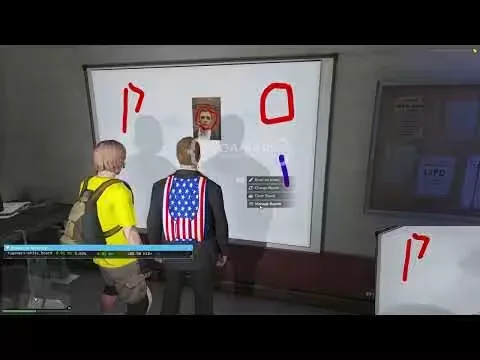
Advanced Whiteboards
Whiteboards your players can actually draw on. Anyone can walk up to a board and sketch on it in real time, with support for up to 10 whiteboards in a single room. Placing a new board is a single command that opens an in-game object placer, so setup happens on the spot instead of in a config file.
Drawings survive a server restart. The boards themselves reset, but everything drawn on them is saved to a standalone no-SQL database and comes back, no MySQL setup required.
Features
- Whiteboard UI: free-hand drawing inside the game, with image support
- Direct URLs: paste a link straight onto the board
- Unlimited images: add as many images to a drawing as you want
- Real time edits: changes show up live as players draw
- Shared editing: allow other players to edit your drawings
- In-game whiteboard placer: create and position boards without touching the config
- Custom stand prop for the boards
- Auto cleanup: configurable timer for when drawings get deleted
- Persistence: drawings are stored in a standalone no-SQL database and restored after restarts
- Detailed configuration for everything above
Requirements
- ox_lib
- ox_target or qb-target (the target integration is exposed, so you can wire in your own)
- PolyZone
Product information
Compatibility, delivery and setup
Check these listing details against your server before checkout. The documentation supplied with the download is the source of truth for exact dependencies, file names and configuration.
Compatibility
- Resource type
- FiveM script
- Category
- AK4Y
- Creator
- Not listed
Order details
- Price
- $10.00
- Delivery
- Unique download link sent by email after checkout
- Sold by
- CFX Tebex Store Official
- Updates
- Lifetime updates included
Installation checklist
Start with the files and readme included with this product.
-
Match the requirements
This listing names esx, qbcore, qbox support. Check the description and readme for required inventory, target, library, database or map resources.
-
Keep the supplied names and order
Do not guess or rename the resource folder. Use the dependency order, config values, SQL and item definitions supplied in the download when they are present.
-
Start it after its dependencies
Upload the folder to
resources/, then addensure <download-folder>toserver.cfgusing the exact downloaded folder name. -
Test before going live
Start it on a development server, check the console for missing dependencies, then test every action described on this page with the integrations used by your live server.
Write a review
Reviews are moderated before appearing. Purchased the product? Your review gets a VERIFIED badge automatically.