What is this?
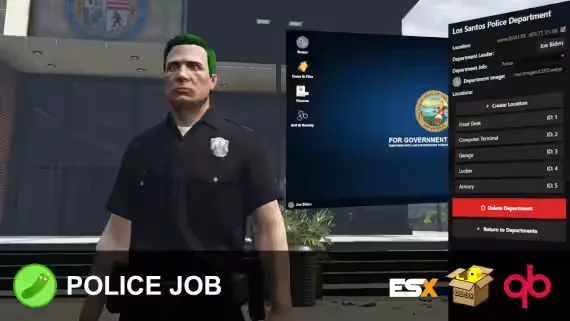
The first in-game police job creator on FiveM. Create, manage, and run multiple police departments entirely in-game, without adding framework jobs or wiring up compatibility across half a dozen scripts. Departments can all run under the same framework job or each use their own, whichever fits your server.
Add modern police tools like grapplers and stab sticks on top of a fully built-in evidence and cases system, and this is the most complete police job you will find on the platform.
Create Departments In-Game
- Add, edit, and remove locations for armories, garages, computer terminals, front desks, and lockers.
- Set each department's logo, title, and leader (Chief of Police).
- The chief can restrict armories and garages behind permissions or ranks, such as Rifle Certified or Air Certified.
Front Desk
- Apply for the department.
- Clock on and off duty (this happens at the front desk).
- View your own recent duty logs.
Computer Terminal: Roster
- Add, manage, and remove ranks, members, and permissions.
- Permissions like Rifle Certified or Air Certified assign specific perms to officers and feed directly into armory and garage access.
- Organize ranks however you like. The only framework tie is a grade number (0 to 4), editable per framework job in config.lua.
- No custom job per department. Every department can simply run as "police" in QB or ESX, since all department data comes from this resource.
- Clocking on and off duty is handled automatically with no framework job setup, and clocking off sets you to unemployed.
Computer Terminal: Cases and Files
- Add, edit, and remove cases and their evidence.
- Import evidence reports collected in the field.
- Write case summaries in a modern text editor with support for embedded images, video, and text.
Evidence
- Collect evidence in the world with the Evidence Camera: scan bullets, blood, and vehicles, and take photos. Everything saves into an evidence report you can import into a case at the terminal.
- BAC, GSR, fingerprint, and blood tests all output evidence reports after they are performed, so you can prove a suspect's BAC at a later date without anyone reaching for clipping software.
- Print a case out and enable Reconstruct Scene mode to see the entire case's evidence outlined in the world while you put the pieces together.
Police Tools
Grappler, stab sticks, object placer, NVG and thermal goggles, snakecams, and shields.
Requirements
- ESX (1.1+), QBox, or QB. The bridge is open, so you can create or edit integrations for other frameworks.
- ox_lib (required, works anywhere).
- Optional, for evidence: any metadata-supported inventory (ox_inventory, qb-inventory, etc).
Credits
- NukePUG for helping create the stab stick prop and grappler rope.
- RogueThunder for creating the grappler model and giving permission to use it.
- Envi Scripts for the exports in envi-addictions that add police job support.
Installation
Follow the steps in the docs, setup is quick.
Product information
Compatibility, delivery and setup
Check these listing details against your server before checkout. The documentation supplied with the download is the source of truth for exact dependencies, file names and configuration.
Compatibility
- Resource type
- FiveM script
- Category
- ESX Scripts
- Creator
- Not listed
Order details
- Price
- $19.99
- Delivery
- Unique download link sent by email after checkout
- Sold by
- CFX Tebex Store Official
- Updates
- Lifetime updates included
Installation checklist
Start with the files and readme included with this product.
-
Match the requirements
This listing names esx, qbcore, qbox support. Check the description and readme for required inventory, target, library, database or map resources.
-
Keep the supplied names and order
Do not guess or rename the resource folder. Use the dependency order, config values, SQL and item definitions supplied in the download when they are present.
-
Start it after its dependencies
Upload the folder to
resources/, then addensure <download-folder>toserver.cfgusing the exact downloaded folder name. -
Test before going live
Start it on a development server, check the console for missing dependencies, then test every action described on this page with the integrations used by your live server.
Write a review
Reviews are moderated before appearing. Purchased the product? Your review gets a VERIFIED badge automatically.


