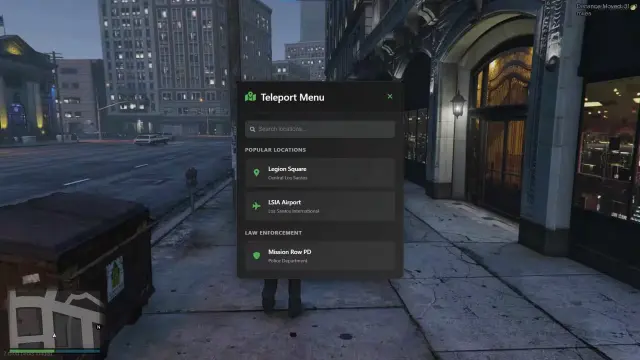
Staff menus usually ship a pile of their own Lua and ask you to trust it. This one goes the other way: the interface is NUI, every menu entry is defined in JSON, and the moderation itself runs through the admin commands your server already has, under the ACE permissions you already granted. It costs nothing, and qb-core is optional, so it works as a standalone panel and gets deeper when the framework is there.
Commands are JSON entries, not code
Everything the menu can do is declared in shared/commands.json. An entry is either a Button that fires on one click or a Form that opens an expandable panel and validates its fields before anything executes. Two flags control behavior: entries marked active: true show a green highlight while enabled, so staff can see godmode or noclip is on without guessing, and entries marked close: true dismiss the menu after running, which is how noclip behaves out of the box.
Forms support seven field types: input for text, number with min, max and step, select as a searchable dropdown fed by static options, an optionsKey, or a live getOptions, plus multi-select, checkbox, slider and autocomplete. Selects can chain, so picking a job loads that job's grades through setOptions and an NUI callback.
Finding things fast
The Commands tab filters by category (All, Player, Vehicle, Utility, User, Server) and searches by label. Any command can be starred as a favorite, and the order is saved locally through Resource KVP.
The Players tab
Opening the menu refreshes a live list of everyone online: server ID, display name, and an actual ped headshot texture per player. On QBCore, expanding a row adds citizen ID, full name, job and grade, gang and grade, and formatted cash and bank balances. Every row carries four quick buttons, Revive, Kill, Kick and Ban, each running the matching server command with that player's ID already filled in.
Quick actions sidebar
A separate icon sidebar, configured in shared/quickactions.json, holds the things staff reach for constantly. Actions can be plain buttons or hover submenus:
- Reload commands: clears saved favorites after a confirmation
- Dev mode: toggles dev mode, highlights while active, fires
hud:client:toggleDev - Copy coords: submenu that puts a vector3 or vector4 on your clipboard
- Logout: QBCore only, runs logout and closes the menu behind you
What ships built in
Built-in actions live in client/commands.lua or register on the server, and surface in the menu through shared/commands.json:
| Command | Type | What it does |
| --- | --- | --- |
| Revive Self | Button | Runs revive |
| Give Armour | Button | Sets ped armour to 100 |
| Remove Stress | Button | QBCore: sets stress metadata to 0 |
| Relieve Needs | Button | QBCore: sets hunger and thirst to 100 |
| Set PedModel | Form | Self or target, 800+ models in pedmodels.json |
| Give Weapon | Form | Weapon and ammo, self or target |
| Give Money | Form | QBCore: cash or bank to a target |
| Set Job | Form | QBCore: target, job and grade, grades load dynamically |
| Set Gang | Form | QBCore: target, gang and grade |
| Give Item | Form | QBCore: target, item and amount |
| Spawn Vehicle | Form | Pick from 3000+ vehicles in vehicles.json |
Server commands such as revive, car, fix, kick and ban are executed with ExecuteCommand, so they need to exist on your server already. The menu is a front end for them, not a replacement.
Three ways to open it
Press U (the default keybind), type /admin, or call TriggerEvent("admin:toggleMenu", true) from your own code, with false to close.
Requirements and setup
ox_lib (callbacks, notifications, dialogs, vehicle properties, clipboard) and oxmysql are required. qb-core is not: without it the player list still shows server IDs and names, with it the menu unlocks citizen IDs, jobs, gangs, items, money readouts and the extra commands above.
Install is short: drop ag-menu into resources, make sure ox_lib and oxmysql start before it, add ensure ag-menu to server.cfg, and grant ACE permissions for whatever your staff should be able to run. The UI comes pre-built under web/build/; if you edit the React source, npm install and npm run build inside web/ rebuilds it.
Product information
Compatibility, delivery and setup
Check these listing details against your server before checkout. The documentation supplied with the download is the source of truth for exact dependencies, file names and configuration.
Compatibility
- Resource type
- FiveM script
- Category
- QBCore Scripts
- Creator
- Not listed
Order details
- Price
- FREE
- Delivery
- Unique download link sent by email after checkout
- Sold by
- CFX Tebex Store Official
- Updates
- Lifetime updates included
Installation checklist
Start with the files and readme included with this product.
-
Match the requirements
This listing names qbcore, qbox support. Check the description and readme for required inventory, target, library, database or map resources.
-
Keep the supplied names and order
Do not guess or rename the resource folder. Use the dependency order, config values, SQL and item definitions supplied in the download when they are present.
-
Start it after its dependencies
Upload the folder to
resources/, then addensure <download-folder>toserver.cfgusing the exact downloaded folder name. -
Test before going live
Start it on a development server, check the console for missing dependencies, then test every action described on this page with the integrations used by your live server.
Write a review
Reviews are moderated before appearing. Purchased the product? Your review gets a VERIFIED badge automatically.