Rahe Boosting System
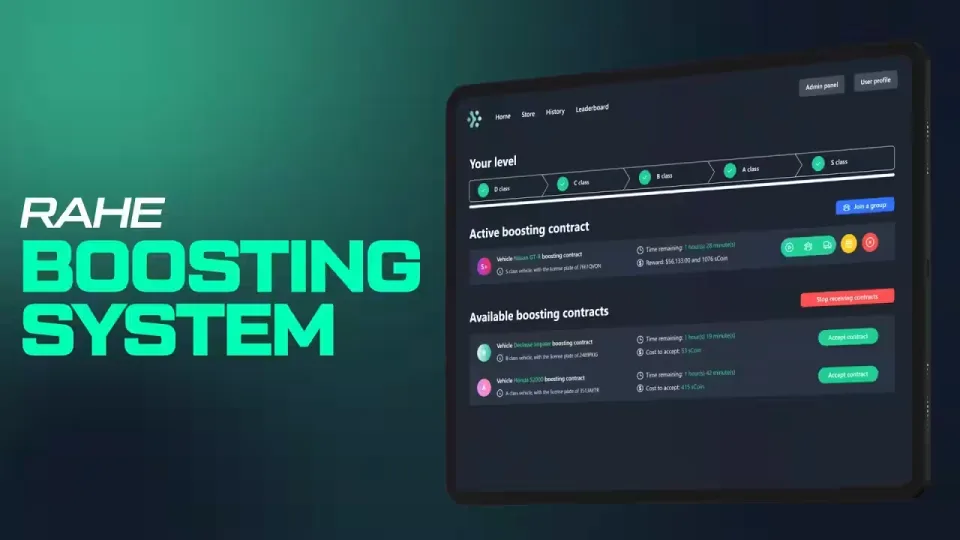
A full vehicle boosting and stealing system: hacking minigame, VIN scratching, contract transferring, a store with a limited stock option, boosting history, a leaderboard, an administration panel and user profiles with custom names and pictures.
Everything we release runs on our own roleplay server for weeks before it reaches Tebex, so the script arrives already tested by hundreds of players, performance optimized and proven. This one is the crowd favorite: since the first version went live, our players have completed over 128,000 boosting contracts, and the most active booster alone has finished more than 1,500 of them. If you run into any issues, our support is waiting in our Discord server.
How boosting works
Add yourself to the queue and contracts start coming in. Each one names a vehicle to steal from a certain area and deliver to the dealer. The search zone is big and tricky, and finding the right car can take a while, which is exactly why it never turns into a boring job of monotonously clicking buttons. Deliver the vehicle and you are paid in money, crypto and experience points. It also gives players something to do during off-peak hours when the server is quiet.
A and S class contracts
At the top classes the easy deliveries stop. NPCs guard the car, its security system has to be hacked, and police receive live notifications of the vehicle's location until the GPS tracker is removed. You will need a second player for these, one driving and one hacking.
Progression drives it all. New players start on the worst vehicles, and levelling up unlocks harder targets with locked doors and NPC protection. That levelling curve is what keeps boosters queueing night after night.
The crypto store
Contracts pay out crypto, which you spend on new high class contracts as you level up, or in the store. You configure which items are purchasable (an example is in our preview video), and the limited stock option caps sales per restart: sell only 2 harnesses per restart but 10 repair kits, for instance. Orders are collected at a delivery spot you configure.
History, leaderboard and profiles
Every completed contract is saved. The history tab shows detailed information about each boost: time, reward, vehicle, class and more. The leaderboard lists other users with their pictures and names, completed contracts, experience points and time last active, and the profile tab lets players set their own name and picture to stand out.
Administration panel
It may seem like a small thing, but our team leans on it constantly. Generate contracts for everybody when you want to liven boosting up or run an event, hand a contract of a chosen class to a specific player, or load someone's data and change their crypto and experience directly. Handy for testing the script, and for giving contracts to popular players when promoting the server. No more going into the database to manually insert rows, everything happens in game.
Performance
Resmon sits at 0.01ms, idle and active.
Dependencies
- oxmysql
- ox_lib
Good to know
This resource is fully open source, no escrow. It works out of the box, but basic scripting knowledge is recommended to use the full potential of the system.
Product information
Compatibility, delivery and setup
Check these listing details against your server before checkout. The documentation supplied with the download is the source of truth for exact dependencies, file names and configuration.
Compatibility
- Resource type
- FiveM script
- Category
- ESX Scripts
- Creator
- Not listed
Order details
- Price
- $30.00
- Delivery
- Unique download link sent by email after checkout
- Sold by
- CFX Tebex Store Official
- Updates
- Lifetime updates included
Installation checklist
Start with the files and readme included with this product.
-
Match the requirements
This listing names esx, qbcore, qbox support. Check the description and readme for required inventory, target, library, database or map resources.
-
Keep the supplied names and order
Do not guess or rename the resource folder. Use the dependency order, config values, SQL and item definitions supplied in the download when they are present.
-
Start it after its dependencies
Upload the folder to
resources/, then addensure <download-folder>toserver.cfgusing the exact downloaded folder name. -
Test before going live
Start it on a development server, check the console for missing dependencies, then test every action described on this page with the integrations used by your live server.
Write a review
Reviews are moderated before appearing. Purchased the product? Your review gets a VERIFIED badge automatically.