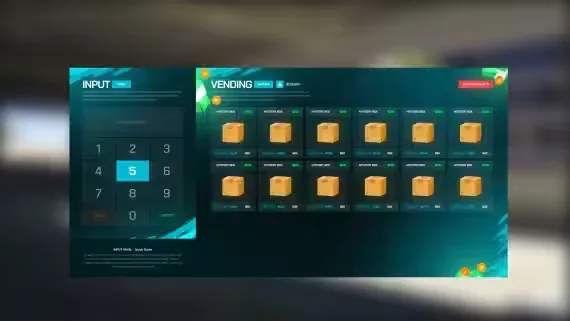
Player Vending Machines
A fully interactive vending machine system for FiveM where the machines themselves hold the money. Admins place them at any coordinates, assign a category like Drinks or Snacks, and set the prices. Players buy straight from the machine in-game, stock drops with every purchase, and the earnings sit inside the machine until the owner comes around to collect. No stock means no sales, so keeping machines filled is part of the loop.
Features
- Admin placement: spawn vending machines at any coordinates, assign a category and set prices
- Category-restricted inventory: each machine only accepts items from its own category, so a drink machine takes drinks and nothing else. Wrong items are blocked at stocking
- Player purchases: buying runs through a clean, responsive UI. Stock decreases on each sale and the funds are saved to the machine
- Owner management: withdraw the accumulated cash from the machine and restock items to keep sales active
- Config friendly: define machine types, allowed items, prices and markers in the config, with toggles for UI and marker behavior plus interaction distances
- Clear feedback: stock levels and the machine's available balance are always visible in the UI
Tip: keep high-traffic locations stocked for maximum passive income.
Product information
Compatibility, delivery and setup
Check these listing details against your server before checkout. The documentation supplied with the download is the source of truth for exact dependencies, file names and configuration.
Compatibility
- Resource type
- FiveM script
- Category
- AK4Y
- Creator
- Not listed
Order details
- Price
- $10.00
- Delivery
- Unique download link sent by email after checkout
- Sold by
- CFX Tebex Store Official
- Updates
- Lifetime updates included
Installation checklist
Start with the files and readme included with this product.
-
Match the requirements
This listing names esx, qbcore, qbox support. Check the description and readme for required inventory, target, library, database or map resources.
-
Keep the supplied names and order
Do not guess or rename the resource folder. Use the dependency order, config values, SQL and item definitions supplied in the download when they are present.
-
Start it after its dependencies
Upload the folder to
resources/, then addensure <download-folder>toserver.cfgusing the exact downloaded folder name. -
Test before going live
Start it on a development server, check the console for missing dependencies, then test every action described on this page with the integrations used by your live server.
Write a review
Reviews are moderated before appearing. Purchased the product? Your review gets a VERIFIED badge automatically.