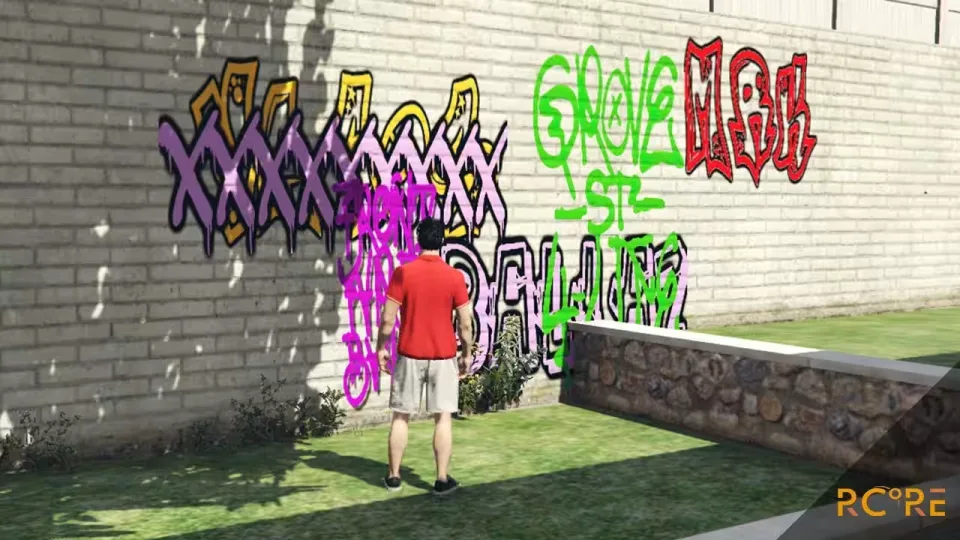
Graffiti/Spray Anything on Walls V2
Ever wanted to tag walls in Los Santos? Now you can. This spray script lets players spray any text, or images your server predefines, on any surface, anywhere on the map. Built for multiplayer and holds up well with lots of players around.
How it works
Players get an item called spray in their inventory. Using it (or typing /spray) opens a spray settings menu where they pick text or an image, a font, a color from the color picker, and the size. The tag stays on the wall until someone hits it with a spray_remover item or it fades out after 2 days, and that lifetime is configurable.
Features
- Works out of the box with ESX and QBCore, easily changeable to any framework
- Beautiful UI
- Both spray and spray remover are inventory items
- Awesome performance
- Displays up to 10 sprays at a time on screen, unlimited map-wide
- 9 preconfigured fonts, and you can add your own (a bit more complicated :)
- Unlimited colors with a color picker
- Text and images are scaleable while spraying
- Sprays survive server restarts, with a configurable number of days before they fade
- Easily add your own images
- Bad word blacklist to keep tags in line with your rules
- Looks great anywhere, day or night. Check out the video for more details
- Supports OneSync and OneSync Infinity
- Works out of the box with our Gang System with Turf Wars
- Most of the source code is included, only a small part is encrypted
Product information
Compatibility, delivery and setup
Check these listing details against your server before checkout. The documentation supplied with the download is the source of truth for exact dependencies, file names and configuration.
Compatibility
- Resource type
- FiveM script
- Category
- ESX Scripts
- Creator
- Not listed
Order details
- Price
- FREE
- Delivery
- Unique download link sent by email after checkout
- Sold by
- CFX Tebex Store Official
- Updates
- Lifetime updates included
Installation checklist
Start with the files and readme included with this product.
-
Match the requirements
This listing names esx, qbcore, qbox support. Check the description and readme for required inventory, target, library, database or map resources.
-
Keep the supplied names and order
Do not guess or rename the resource folder. Use the dependency order, config values, SQL and item definitions supplied in the download when they are present.
-
Start it after its dependencies
Upload the folder to
resources/, then addensure <download-folder>toserver.cfgusing the exact downloaded folder name. -
Test before going live
Start it on a development server, check the console for missing dependencies, then test every action described on this page with the integrations used by your live server.
Write a review
Reviews are moderated before appearing. Purchased the product? Your review gets a VERIFIED badge automatically.


