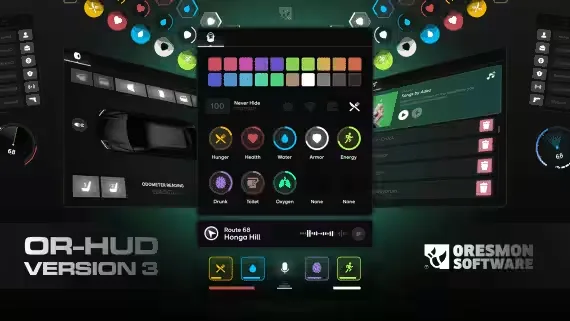
0R-HUD V3 is a free NoPixel 4.0 inspired HUD for FiveM that ships with 11 status HUD designs and 10 speedometers, and it idles at a resmon of 0.00 to 0.01. It runs on ESX and QBCore, and every player's settings save automatically when they exit the game.
Display
- 11 status HUD designs and 10 speedometer styles to choose from
- 2 different minimap options
- Map can be set to show only while driving or walking
- HUD bar toggles off and on, and statuses only appear once they pass the value you set
- Speedometer includes an FPS readout
- Gear display with manual and auto modes
- Speed in km/h or mph, clock in 12 or 24 hour format
Systems you decide on
- Stress: activate or deactivate the stress system
- Seatbelt: disable the belt system completely if your server does not use one
- Settings menu: can be turned off entirely so players keep your defaults
- Voice: voice settings supported through pma-voice and SaltyChat
- Fuel: hook in your own custom fuel resource
- Vehicle blacklist: disable the car HUD or the belt system per vehicle
Config
- The hud, belt and cinematic commands can all be renamed
- Key assignments can be remapped
- Clean UI with an easy config
- All settings persist on game exit
Product information
Compatibility, delivery and setup
Check these listing details against your server before checkout. The documentation supplied with the download is the source of truth for exact dependencies, file names and configuration.
Compatibility
- Resource type
- FiveM script
- Category
- 0Resmon
- Creator
- Not listed
Order details
- Price
- FREE
- Delivery
- Unique download link sent by email after checkout
- Sold by
- CFX Tebex Store Official
- Updates
- Lifetime updates included
Installation checklist
Start with the files and readme included with this product.
-
Match the requirements
This listing names esx, qbcore, qbox support. Check the description and readme for required inventory, target, library, database or map resources.
-
Keep the supplied names and order
Do not guess or rename the resource folder. Use the dependency order, config values, SQL and item definitions supplied in the download when they are present.
-
Start it after its dependencies
Upload the folder to
resources/, then addensure <download-folder>toserver.cfgusing the exact downloaded folder name. -
Test before going live
Start it on a development server, check the console for missing dependencies, then test every action described on this page with the integrations used by your live server.
Write a review
Reviews are moderated before appearing. Purchased the product? Your review gets a VERIFIED badge automatically.