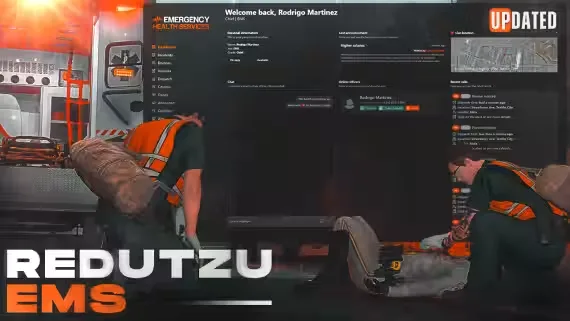
Free EMS MDT by Redutzu
A free medical dispatch and incident management system for FiveM servers that take EMS, fire and hospital roleplay seriously. Everything a responder needs sits in one interface: incident creation, call handling, patient tracking, notifications and automatic invoice generation, so a medic can log a callout, track the patient and bill them without leaving the MDT.
The UI is clean, modern and fully configurable, with a modal system, integrated calls and a fast notification system built in. Nothing is encrypted, so developers and server owners can open the interface files and restyle or extend whatever they want. Resmon stays at 0.00ms both idle and in active use, so the realistic workflow costs your server nothing.
Built for EMS crews, Fire Departments, Rescue Services and hospital roleplay teams.
What You Get
- Incident and call management: create incidents and handle calls from one screen
- Patient tracking: follow patients through the whole callout
- Automatic invoices: billing generated for you after treatment
- Real-time notifications: fast alerts plus an integrated modal system
- Non-encrypted UI: fully customizable, open for your own edits
- 0.00ms performance: idle and in use
Product information
Compatibility, delivery and setup
Check these listing details against your server before checkout. The documentation supplied with the download is the source of truth for exact dependencies, file names and configuration.
Compatibility
- Resource type
- FiveM script
- Category
- ESX Scripts
- Creator
- Not listed
Order details
- Price
- FREE
- Delivery
- Unique download link sent by email after checkout
- Sold by
- CFX Tebex Store Official
- Updates
- Lifetime updates included
Installation checklist
Start with the files and readme included with this product.
-
Match the requirements
This listing names esx, qbcore, qbox support. Check the description and readme for required inventory, target, library, database or map resources.
-
Keep the supplied names and order
Do not guess or rename the resource folder. Use the dependency order, config values, SQL and item definitions supplied in the download when they are present.
-
Start it after its dependencies
Upload the folder to
resources/, then addensure <download-folder>toserver.cfgusing the exact downloaded folder name. -
Test before going live
Start it on a development server, check the console for missing dependencies, then test every action described on this page with the integrations used by your live server.
Write a review
Reviews are moderated before appearing. Purchased the product? Your review gets a VERIFIED badge automatically.