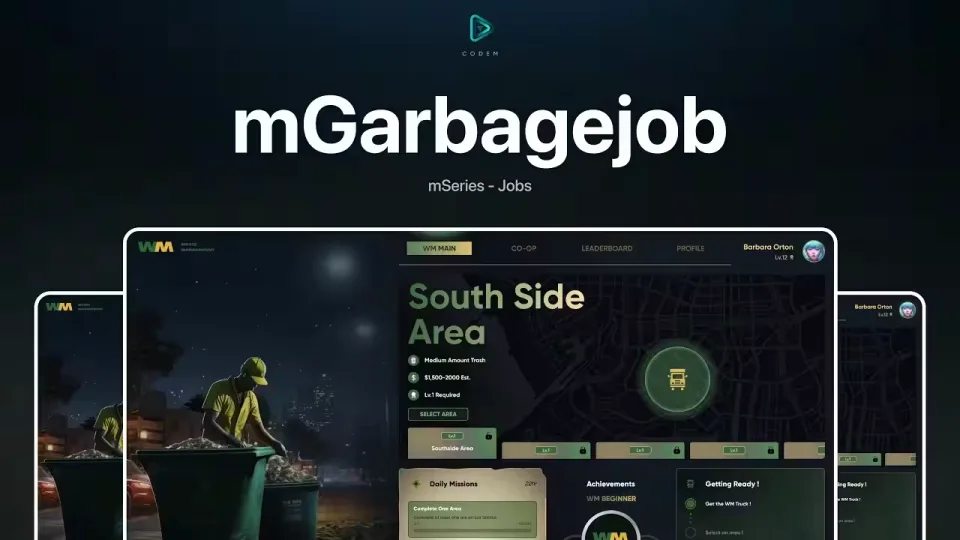
FREE mGarbagejob
A free garbage job for ESX and QBCore from CodeM, built around lobbies and co-op runs instead of the usual solo trash route.
Pick Your Route, Start Working
Players open the job UI and choose which area of the city they want to collect in. The getting ready section shows their status before the run starts, and daily missions sit in the same menu so there is always a reason to clock in.
Co-op Lobbies With Host Control
Whoever hosts the lobby picks the job area for the group. Running missions together pays off directly: every participant in a co-op mission earns x2 EXP and money.
City Leaderboard
The script tracks who the city's Waste Management leader is, with the top 3 drawn into its own city UI. Sanitation becomes something players actually compete over.
Profile and Work Logs
Each player has a profile showing their level, completed jobs and total earnings, along with their latest work logs, so progress on the job carries over between sessions.
Product information
Compatibility, delivery and setup
Check these listing details against your server before checkout. The documentation supplied with the download is the source of truth for exact dependencies, file names and configuration.
Compatibility
- Resource type
- FiveM script
- Category
- CodeM
- Creator
- Not listed
Order details
- Price
- FREE
- Delivery
- Unique download link sent by email after checkout
- Sold by
- CFX Tebex Store Official
- Updates
- Lifetime updates included
Installation checklist
Start with the files and readme included with this product.
-
Match the requirements
This listing names esx, qbcore, qbox support. Check the description and readme for required inventory, target, library, database or map resources.
-
Keep the supplied names and order
Do not guess or rename the resource folder. Use the dependency order, config values, SQL and item definitions supplied in the download when they are present.
-
Start it after its dependencies
Upload the folder to
resources/, then addensure <download-folder>toserver.cfgusing the exact downloaded folder name. -
Test before going live
Start it on a development server, check the console for missing dependencies, then test every action described on this page with the integrations used by your live server.
Write a review
Reviews are moderated before appearing. Purchased the product? Your review gets a VERIFIED badge automatically.


